csharptutorial.net / 14

C# · Control flow

if / else and loops

Make choices with conditions. Repeat work with while, do while and for.
Workshop repo: git.fhict.nl/I872272/csharpbasics Last modified:

Today

Conditions

  • if
  • if else
  • if else if

Loops

  • while — pretest
  • do while — posttest
  • for — counted

Per topic

  • Flowchart
  • Syntax
  • Concrete example

Diagrams and examples based on csharptutorial.net.

C# if

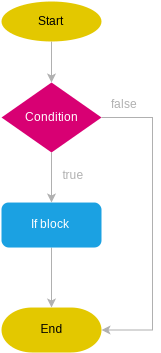
Flowchart of if statement

Condition true → run the if block. False → skip to End.

Syntax

if (condition)
{
    // statements
}
if condition:
    # statements
  • Evaluates a boolean condition.
  • Runs the block only when the result is true.
  • Always use braces { }, even for one statement.
  • Indentation defines the block — keep it consistent.

if — example

Example

string condition = "sunny";
bool free = true;

if (condition == "sunny" && free)
{
    Console.WriteLine("Let's go outside.");
}
condition = "sunny"
free = True

if condition == "sunny" and free:
    print("Let's go outside.")
Let's go outside.

How it works

  • condition == "sunny" → true
  • free → true
  • && needs both true → block runs
  • and needs both true → block runs
  • If either part is false → nothing printed

C# if else

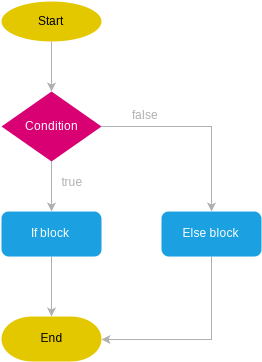
Flowchart of if else

True → if block. False → else block. Always one of the two.

Syntax

if (condition)
{
    // if statements
}
else
{
    // else statements
}
if condition:
    # if statements
else:
    # else statements
string condition = "rainy";

if (condition == "sunny")
{
    Console.WriteLine("Let's go outside.");
}
else
{
    Console.WriteLine("Just stay home.");
}
condition = "rainy"

if condition == "sunny":
    print("Let's go outside.")
else:
    print("Just stay home.")
Just stay home.

C# if else if / elif

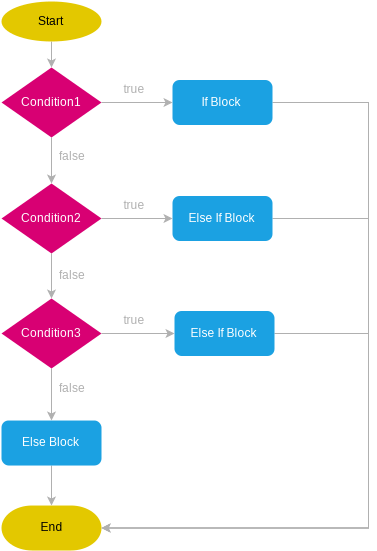
Flowchart of if else if

Checks conditions top to bottom. First true block wins; optional else is the fallback.

Syntax

if (condition1)
{
    // block 1
}
else if (condition2)
{
    // block 2
}
else if (condition3)
{
    // block 3
}
else
{
    // else block (optional)
}
if condition1:
    # block 1
elif condition2:
    # block 2
elif condition3:
    # block 3
else:
    # else block (optional)

if else if — BMI example

BMI = Body Mass Index

BMI = weight height²

weight in kg, height in m

BMI scale

Underweight
Healthy Weight
Overweight
Obesity
  • Underweight < 18.5
  • Healthy Weight ≥ 18.5 and < 25
  • Overweight ≥ 25 and < 30
  • Obesity ≥ 30
double weight = 104;
double height = 2;
double bmi = weight / (height * height);
string weightStatus;

if (bmi < 18.5)
{
    weightStatus = "Underweight";
}
else if (bmi >= 18.5 && bmi < 25)
{
    weightStatus = "Healthy Weight";
}
else if (bmi >= 25 && bmi < 30)
{
    weightStatus = "Overweight";
}
else
{
    weightStatus = "Obesity";
}
Console.WriteLine(bmi);
Console.WriteLine(weightStatus);
weight = 104
height = 2
bmi = weight / (height * height)
weight_status = None

if bmi < 18.5:
    weight_status = "Underweight"
elif bmi >= 18.5 and bmi < 25:
    weight_status = "Healthy Weight"
elif bmi >= 25 and bmi < 30:
    weight_status = "Overweight"
else:
    weight_status = "Obesity"
print(bmi)
print(weight_status)

Why this shape?

  • More than two outcomes
  • A BMI can belong to only one category — the ranges don’t overlap
  • Order can matter — first match stops the chain
  • else catches everything else
26 Overweight

BMI — other ways

Same result as the range version — different writing styles.

Only upper bounds

After a failed check, BMI is already ≥ that bound — so && is unnecessary.

if (bmi < 18.5)
{
    weightStatus = "Underweight";
}
else if (bmi < 25)
{
    weightStatus = "Healthy Weight";
}
else if (bmi < 30)
{
    weightStatus = "Overweight";
}
else
{
    weightStatus = "Obesity";
}
if bmi < 18.5:
    weight_status = "Underweight"
elif bmi < 25:
    weight_status = "Healthy Weight"
elif bmi < 30:
    weight_status = "Overweight"
else:
    weight_status = "Obesity"

Reordered (high → low)

Check the high end first; then the next branch is automatically below that bound.

if (bmi >= 30)
{
    weightStatus = "Obesity";
}
else if (bmi >= 25)
{
    weightStatus = "Overweight";
}
else if (bmi >= 18.5)
{
    weightStatus = "Healthy Weight";
}
else
{
    weightStatus = "Underweight";
}
if bmi >= 30:
    weight_status = "Obesity"
elif bmi >= 25:
    weight_status = "Overweight"
elif bmi >= 18.5:
    weight_status = "Healthy Weight"
else:
    weight_status = "Underweight"

Same ranges, different order

Same conditions as slide 7, only shuffled. Still correct — the ranges do not overlap.

if (bmi >= 25 && bmi < 30)
{
    weightStatus = "Overweight";
}
else if (bmi < 18.5)
{
    weightStatus = "Underweight";
}
else if (bmi >= 18.5 && bmi < 25)
{
    weightStatus = "Healthy Weight";
}
else
{
    weightStatus = "Obesity";
}
if bmi >= 25 and bmi < 30:
    weight_status = "Overweight"
elif bmi < 18.5:
    weight_status = "Underweight"
elif bmi >= 18.5 and bmi < 25:
    weight_status = "Healthy Weight"
else:
    weight_status = "Obesity"

Takeaway

Mutually exclusive ranges → order can change and the answer stays the same. Overlapping conditions → order becomes critical.

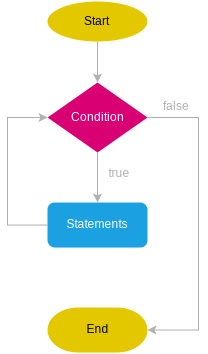
C# while (pretest loop)

Start other code / init Condition Statements End true false

Check first. Body may run zero times if the condition starts false.

Syntax

while (expression)
{
    // statement
}
while expression:
    # statement

Example

int counter = 0;
while (counter < 4)
{
    counter++;
    Console.WriteLine(counter);
}counter = 0
while counter < 4:
    counter += 1
    print(counter)

Inspector

counter = —

Output

C# do while (posttest loop)

Start other code / init Statements Condition End true false

Body runs first. Condition is checked at the end — at least one iteration.

Syntax

do
{
    // statement
} while (expression);
while True:
    # statement
    if not expression:
        break

Example

int counter = 0;
do
{
    counter++;
    Console.WriteLine(counter);
}
while (counter < 4);counter = 0
while True:
    counter += 1
    print(counter)
    if not (counter < 4):
        break

Inspector

counter = —

Output

Difference vs while

  • do while always runs the body at least once — condition is checked afterwards.
  • while may run zero times if the condition starts false.
  • Same output here (counter starts at 0). The difference shows when the start condition is already false.

while vs do while

int n = 10;

while (n < 4)
{
    Console.WriteLine("while");
}

do
{
    Console.WriteLine("do while");
} while (n < 4);
n = 10

while n < 4:
    print("while")

while True:
    print("do while")
    if not (n < 4):
        break
do while

Rule of thumb

  • while: maybe never — check first
  • do while: at least once — menus, “try again?”, input until valid
  • Inside the loop: change something so the condition can become false (avoid infinite loops)

C# for loop

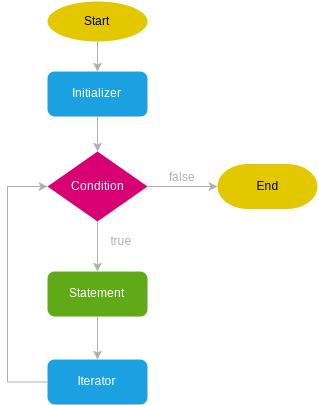
Start Initializer / init Condition End Statement Iterator true false loop

Initializer once → check condition → body → iterator → check again.

Syntax

for (initializer; condition; iterator)
{
    // statement
}
for item in iterable:
    # statement
Part When
initializer Once, before the loop
condition Before each iteration
iterator After each iteration

Example

for (int i = 0; i < 3; i++)
{
    Console.WriteLine(i);
}for i in range(0, 3):
    print(i)

Inspector

i = —

Output

for — examples

Example

for (int i = 1; i < 10; i += 2)
{
    Console.WriteLine(i);
}
for i in range(1, 10, 2):
    print(i)
1 3 5 7 9
int total = 0;
for (int i = 1; i <= 4; i++)
{
    total += i;
}
Console.WriteLine($"Total:{total}");
total = 0
for i in range(1, 5):
    total += i
print(f"Total:{total}")
Total:10
for (int i = 0; i < 10; i++)
{
    if (i % 2 == 0)
    {
        Console.Write($"{i} ");
    }
}
for i in range(10):
    if i % 2 == 0:
        print(i, end=" ")

%

a % b is the remainder after dividing a by b.

  • 17 % 5 → 2 — 5+5+5 = 15, leftover 2
  • 10 % 3 → 1 — 3+3+3 = 9, leftover 1
0 2 4 6 8
string message = "Hello";

for (int i = 0; i < message.Length; i++)
{
    Console.WriteLine(message[i]);
}
message = "Hello"

for ch in message:
    print(ch)
H e l l o

Which loop?

Situation Prefer
You know how many times (count, index, range) for
Keep going while something is true — maybe zero times while
Must run once (read input, then decide) do whilewhile True + break
Choose between paths / ranges if / if else / if else if

You can nest them: a for with an if inside is normal.

Takeaways

if family

Branch on conditions. Prefer flat if else if over deep nesting.

while / do

Repeat until a condition fails. Pretest vs posttest.

for

Counted repetition:
init → check / condition → body / statement(s) → step / iteration.

Sources: if · if else · if else if · while · do while · for

Workshop repo: https://git.fhict.nl/I872272/csharpbasics Last modified:

← → space · F for fullscreen